CFD OpenFoam Sauna
Introduction
1
This is not working due to the chimney and air outlet breaks viscosity and enthalpy. Try simpler method: CFD OpenFoam Sauna: boiler or (not working) OpenFOAM: Simple Chimney.
Use OpenFOAM to analyze the heating of water above sauna's oven. The problem is during the winter when the water freezes.
Other possibilities would be to create a simple Laplacian solver. but I'd like to include Navier-Stokes equations and perhaps energy equation: ice melts into water, water freezes, latent heat is released and the interfaces move.
The sauna problem is a transient, buoyancy-driven heat-transfer (convection) problem. A three-region conjugate heat-transfer (CHT) model: water, steel, and gas, using OpenFOAM 13 with gravity and temperature dependent density in water and gas.
Heat transfer from gas to water
Hot gas inside the pipe (Tg = 400C, gas convection h_g) → heat flow Q → metal pipe wall (thickness t, conductivity k_m) → heat flow Q → water outside pipe T_w, water convection h_w.
For a thin metal wall, we can initially neglect the temperature drop through the metal. The model then becomes especially simple:
- Gas-side coefficient: hg=50 W/(m2K)
- Water-side coefficient: hw=500 W/(m2K)
- Gas temperature: Tg=400∘C
| T_w | T_pipe |
|---|---|
| 1°C | 37.3°C |
| 20°C | 54.5°C |
| 65°C | 95.5°C |
| 90°C | 118.2°C |
Estimate the natural-draft velocity
At atmospheric pressure, ideal-gas densities are approximately: Ambient air at 20∘C, ρ_a≈1.20 kg/m3 and air at 400∘C, ρ_g≈0.52 kg/m3. These are approximate values consistent with standard air-property data (NIST). The maximum buoyancy pressure over 5 m, assuming the entire gas column remains at 400∘C. Failed to parse (syntax error): {\displaystyle \Delta p\approx gH(\rho_a-\rho_g) = 9.81(0.5)(1.20-0.52)\approx33.4 Pa. }
If all of that pressure became dynamic pressure, the ideal velocity would be A real pipe loses pressure to friction and the entrance and exit.
At 400°C, the air properties are approximately:
- Thermal conductivity kg≈0.05 W/(m K)
- Dynamic viscosity μ≈3.3×10⁻⁵ Pa s
- Prandtl number Pr≈0.7
Water
Transient, buoyancy-driven, incompressible liquid with temperature-dependent density and viscosity. Use Boussinesq model if the density variation is sufficiently small; over 5–95 °C, a temperature-dependent liquid-density model is preferable for quantitative predictions.
The initial temperature is 1 °C, but the water has a density maximum near 4 °C. So the simple linear Boussinesq model might be wrong.
Constant-density water is a useful baseline, but it cannot reproduce temperature-driven buoyancy correctly. rpolynomial equation of state, which models density as a function of temperature and pressure.
The gas and pipe
Gas inlet is at constant temp is 400 deg, and the top outlet is to ambient air, which is not modeled. Also, some initial velocity might be included for the hot air from the combustion chamber which will not be modeled.
Laminar natural convection, or turbulent flow. In the first version, the gas flow can be modeled as laminar.
1
1
Startup seq and mesh
-
 The mesh with the three regions and interface parts.
 -
 The mesh from geo file and triangulation made in GMSH.


cd  OpenFOAM/. . .
source /opt/OpenFOAM/OpenFOAM-13/etc/bashrc
- Outer dimensions: 0.40×0.20×0.50 m
- Outer corner radius: 0.02 m
- Hole diameter: 0.10 m
- Hole centre: x=0.10 m
- x=0.10 m, y=0.10 m
- The hole extends through the full 0.50 m height.
- The rounded-rectangle outline is constant along the height, with rounded corners at both the bottom and top.
Use gmsh and convert it and check mesh
gmsh rounded_body.geo -3 -o rounded_body.msh -format msh2
gmshToFoam rounded_body.msh
checkMesh
To visualise use either
gmshto see the .geo file. Mesh → 3D to generate the volume mesh.paraFoam
Running the OpenFOAM
There are multiple libraries and files involved, but
foamMultiRun 2>&1 | tee log.foamMultiRun
runs the code
To remove all simulated data use foamListTimes -rm
Split the mesh into regions
The mesh code
- Water region
- Bulk
- Near pipe
- Steel region
- Gas region
- Bulk
- Near pipe
Use Python to create the mesh, then Tools -> visibility to show or hide parts.
import gmsh
import math
import sys

gmsh.initialize()
gmsh.model.add("heated_pipe_container")
occ = gmsh.model.occ

# ============================================================
# 1. GEOMETRY [m]
# ============================================================
L, W, Hwater = 0.40, 0.20, 0.50
corner = 0.02

Ro = 0.050
tsteel = 0.002
Ri = Ro - tsteel

Hpipe = 5.0
z_container = 1.2
z_water_top = z_container + Hwater

xc, yc = 0.1, 0.1
tol = 1e-6

# Initial mesh size targets [m]
h_water = 0.010
h_pipe = 0.010
h_steel = 0.001

# ============================================================
# 2. ROUNDED-RECTANGLE CONTAINER OUTLINE
# ============================================================
r = corner
z = z_container

surfaces = [
    occ.addRectangle(r, 0, z, L - 2*r, W),
    occ.addRectangle(0, r, z, L, W - 2*r),
    occ.addDisk(r, r, z, r, r),
    occ.addDisk(L-r, r, z, r, r),
    occ.addDisk(L-r, W-r, z, r, r),
    occ.addDisk(r, W-r, z, r, r),
]

fused, _ = occ.fuse(
    [(2, surfaces[0])],
    [(2, s) for s in surfaces[1:]],
    removeObject=True,
    removeTool=True
)

outline = [tag for dim, tag in fused if dim == 2]
if not outline:
    raise RuntimeError("Rounded rectangle union failed")

extruded = occ.extrude(
    [(2, s) for s in outline],
    0, 0, Hwater
)
outer_volumes = [tag for dim, tag in extruded if dim == 3]

# ============================================================
# 3. WATER: CONTAINER MINUS PIPE OUTSIDE
# ============================================================
cut_cylinder = occ.addCylinder(
    xc, yc, z_container, 0, 0, Hwater, Ro
)

water_result, _ = occ.cut(
    [(3, v) for v in outer_volumes],
    [(3, cut_cylinder)],
    removeObject=True,
    removeTool=True
)
water_original = [tag for dim, tag in water_result if dim == 3]

if not water_original:
    raise RuntimeError("Water volume creation failed")

# ============================================================
# 4. STEEL ANNULUS, FULL PIPE HEIGHT
# ============================================================
steel_outer = occ.addCylinder(
    xc, yc, 0, 0, 0, Hpipe, Ro
)
steel_inner_tool = occ.addCylinder(
    xc, yc, 0, 0, 0, Hpipe, Ri
)

steel_result, _ = occ.cut(
    [(3, steel_outer)],
    [(3, steel_inner_tool)],
    removeObject=True,
    removeTool=True
)
steel_original = [tag for dim, tag in steel_result if dim == 3]

if not steel_original:
    raise RuntimeError("Steel volume creation failed")

# ============================================================
# 5. GAS PASSAGE, OPEN AT BOTH ENDS
# ============================================================
gas_original_tag = occ.addCylinder(
    xc, yc, 0, 0, 0, Hpipe, Ri
)

occ.synchronize()

# ============================================================
# 6. FRAGMENT AND PRESERVE REGION IDENTITY
#
# The returned map associates each input volume with its
# resulting entities. This avoids classifying by width.
# ============================================================
objects = [(3, v) for v in water_original]
tools = (
    [(3, v) for v in steel_original]
    + [(3, gas_original_tag)]
)

fragmented, fragment_map = occ.fragment(
    objects,
    tools,
    removeObject=True,
    removeTool=True
)
occ.synchronize()

def mapped_volumes(map_entries):
    result = set()
    for entry in map_entries:
        for dim, tag in entry:
            if dim == 3:
                result.add(tag)
    return result

nwater = len(objects)
nsteel = len(steel_original)

water_tags = mapped_volumes(fragment_map[:nwater])
steel_tags = mapped_volumes(
    fragment_map[nwater:nwater+nsteel]
)
gas_tags = mapped_volumes(
    fragment_map[nwater+nsteel:]
)

# Retain only entities that actually exist in the model
existing_volumes = {
    tag for dim, tag in gmsh.model.getEntities(3)
}
water_tags &= existing_volumes
steel_tags &= existing_volumes
gas_tags &= existing_volumes

if not water_tags or not steel_tags or not gas_tags:
    raise RuntimeError(
        "Region tracking failed. "
        f"water={water_tags}, steel={steel_tags}, gas={gas_tags}"
    )

if water_tags & steel_tags or water_tags & gas_tags \
        or steel_tags & gas_tags:
    raise RuntimeError("A volume was assigned to multiple regions")

# ============================================================
# 7. VOLUME PHYSICAL GROUPS
# ============================================================
def add_group(dim, tags, group_id, name):
    tags = sorted(set(tags))
    if tags:
        gmsh.model.addPhysicalGroup(dim, tags, group_id)
        gmsh.model.setPhysicalName(dim, group_id, name)

add_group(3, water_tags, 1, "water")
add_group(3, steel_tags, 2, "steel")
add_group(3, gas_tags, 3, "gas")

# ============================================================
# 8. IDENTIFY SURFACES BY ADJACENT VOLUMES
# ============================================================
water_steel = []
steel_gas = []
water_exterior = []
steel_exterior = []
gas_inlet = []
gas_outlet = []

for dim, s in gmsh.model.getEntities(2):
    upward, downward = gmsh.model.getAdjacencies(2, s)
    adjacent = set(upward)

    is_water = bool(adjacent & water_tags)
    is_steel = bool(adjacent & steel_tags)
    is_gas = bool(adjacent & gas_tags)

    xmin, ymin, zmin, xmax, ymax, zmax = \
        gmsh.model.getBoundingBox(2, s)

    # Shared water/steel interface
    if is_water and is_steel:
        water_steel.append(s)

    # Shared steel/gas interface
    if is_steel and is_gas:
        steel_gas.append(s)

    # External surfaces adjacent to only one region
    if len(adjacent) == 1:
        if is_water:
            water_exterior.append(s)

        if is_steel:
            steel_exterior.append(s)

        # Gas openings at the bottom and top
        if is_gas and abs(zmin) < tol and abs(zmax) < tol:
            gas_inlet.append(s)

        if is_gas and abs(zmin-Hpipe) < tol \
                and abs(zmax-Hpipe) < tol:
            gas_outlet.append(s)

# ============================================================
# 9. SURFACE PHYSICAL GROUPS
# ============================================================
add_group(2, water_steel, 11, "waterSteelInterface")
add_group(2, steel_gas, 12, "gasSteelInterface")
add_group(2, water_exterior, 13, "waterExterior")
add_group(2, steel_exterior, 14, "steelExterior")
add_group(2, gas_inlet, 15, "gasInlet")
add_group(2, gas_outlet, 16, "gasOutlet")

# ============================================================
# 10. CHECK EXPECTED GEOMETRY
# ============================================================
def total_volume(tags):
    return sum(
        occ.getMass(3, tag) for tag in tags
    )

print("\n--- Geometry report ---")
print("Water volume tags:", sorted(water_tags))
print("Steel volume tags:", sorted(steel_tags))
print("Gas volume tags:", sorted(gas_tags))

print("Water volume [m3]:", total_volume(water_tags))
print("Steel volume [m3]:", total_volume(steel_tags))
print("Gas volume [m3]:", total_volume(gas_tags))

print("\n--- Surface groups ---")
print("Water/steel interface:", len(water_steel))
print("Gas/steel interface:", len(steel_gas))
print("Water exterior:", len(water_exterior))
print("Steel exterior:", len(steel_exterior))
print("Gas inlet:", len(gas_inlet))
print("Gas outlet:", len(gas_outlet))

if not water_steel:
    raise RuntimeError("Water/steel interface not found")
if not steel_gas:
    raise RuntimeError("Gas/steel interface not found")
if not gas_inlet or not gas_outlet:
    raise RuntimeError("Gas inlet/outlet not found")

# ============================================================
# 11. MESH SETTINGS
# ============================================================
gmsh.option.setNumber("Mesh.MeshSizeMin", 0.001)
gmsh.option.setNumber("Mesh.MeshSizeMax", h_water)
gmsh.option.setNumber("Mesh.Algorithm3D", 1)
#gmsh.option.setNumber("Mesh.MshFileVersion", 4.1)
gmsh.option.setNumber("Mesh.MshFileVersion", 2.2)
gmsh.option.setNumber("Mesh.Binary", 0)

# Assign approximate sizes to points bounding each region.
# This is only a starting point, not a layered wall mesh.
for tag in water_tags:
    boundary = gmsh.model.getBoundary(
        [(3, tag)], False, False, False
    )
    points = [
        ptag for dim, ptag in boundary if dim == 0
    ]
    if points:
        gmsh.model.mesh.setSize(
            [(0, p) for p in points], h_water
        )

for tag in gas_tags:
    boundary = gmsh.model.getBoundary(
        [(3, tag)], False, False, False
    )
    points = [
        ptag for dim, ptag in boundary if dim == 0
    ]
    if points:
        gmsh.model.mesh.setSize(
            [(0, p) for p in points], h_pipe
        )

# Generate and save
gmsh.model.mesh.generate(3)
gmsh.write("heated_pipe_container.msh")

print("\nCreated heated_pipe_container.msh")
print("Inspect the named physical groups in Gmsh.")

gmsh.finalize()
The water container mesh code (OLD)
SetFactory("OpenCASCADE");

// Dimensions [m]
L = 0.40;
W = 0.20;
H = 0.50;
R = 0.02;
Rh = 0.05;

xh = 0.10;
yh = 0.10;

lc = 0.008;

// Rounded rectangle cross-section
Rectangle(1) = {R, 0, 0, L-2*R, W};
Rectangle(2) = {0, R, 0, L, W-2*R};

Disk(3) = {R,   R,   0, R};
Disk(4) = {L-R, R,   0, R};
Disk(5) = {L-R, W-R, 0, R};
Disk(6) = {R,   W-R, 0, R};

outer[] = BooleanUnion {
  Surface{1}; Delete;
}{
  Surface{2,3,4,5,6}; Delete;
};

// Solid heated rod: remove it from the fluid region
Disk(20) = {xh, yh, 0, Rh};

fluid2D[] = BooleanDifference {
  Surface{outer[]}; Delete;
}{
  Surface{20}; Delete;
};

// Extrude the fluid cross-section
fluid[] = Extrude {0, 0, H} {
  Surface{fluid2D[]};
  Layers{50};
};

// Mesh refinement
Mesh.CharacteristicLengthMin = lc;
Mesh.CharacteristicLengthMax = lc;
Mesh.ElementOrder = 1;
Mesh.Algorithm3D = 1;
Mesh.MshFileVersion = 2.2;
Gas
The file constant/gas/physicalProperties states equationOfState perfectGas;
1
1
1
1
1
1
OpenFOAM
1
1
Tutorials from www pages
The object is to study Lid-driven cavity flow, at $FOAM_TUTORIALS/incompressible/icoFoam/cavity/cavity but my version doesn't include that. It can be found using
find $FOAM_TUTORIALS -type d -name cavity
which gives many options
/opt/OpenFOAM/OpenFOAM-13/tutorials/incompressibleFluid/cavity
/opt/OpenFOAM/OpenFOAM-13/tutorials/fluid/cavity
/opt/OpenFOAM/OpenFOAM-13/tutorials/legacy/incompressible/icoFoam/cavity
- tutorials/incompressibleFluid/cavity
- This is the current, modern OpenFOAM 13 tutorial. It uses the new modular solver framework (foamRun with the incompressibleFluid module) instead of the old standalone icoFoam solver. This is the version the OpenFOAM 13 User Guide is referring to when it describes the reorganized tutorials.
- tutorials/fluid/cavity
- This is a more general fluid solver tutorial. It is intended for the newer unified fluid module and is not the best place to start if you're learning the basics of incompressible CFD.
- tutorials/legacy/incompressible/icoFoam/cavity use
Allrun- This is the classic tutorial from older OpenFOAM releases. It exists mainly for backward compatibility with older documentation and courses
Data and folder structure. OpenFOAM data is stored in a set of files within a case directory rather than in a single case file: 0 constant system.
Mesh generation. Use the blockMesh mesh generator. (Use paraFoam to view the mesh.) Instead use foamToVTK to generate a new dir and paraview to open and view the mesh.
Running. Old: Eg icoFoam. Newer version has Allrun.
Workflow
- Generate mesh
- For example: blockMesh
- Run solver
- Example: laplacianFoam or: buoyantSimpleFoam
- View results
- paraFoam
Use foamSearch <keyword> or find $FOAM_TUTORIALS -type f | grep <keyword> . For example: find $FOAM_TUTORIALS -type f | grep laplacian will show every diffusion example. Start with laplacianFoam → buoyantSimpleFoam → conjugate heat transfer examples.
Tutorials
ls $FOAM_TUTORIALS
Installation and using
Installation is a long process, it takes many hours using yay.
ofoam
source /opt/OpenFOAM/OpenFOAM-13/etc/bashrc
Create an OpenFOAM case directory
mkdir -p ~/Documents/ofoam/constant/polyMesh
mkdir -p ~/Documents/ofoam/system
mkdir -p ~/Documents/ofoam/0
Put your Gmsh mesh there:
cp thermal_test.msh ~/Documents/ofoam/
cd ~/Documents/ofoam
Copy the tutorials to start easier
cp -r $FOAM_TUTORIALS/heatTransfer/chtMultiRegionFoam/* ~/Documents/ofoam/
Then convert:
gmshToFoam thermal_test.msh
This will populate:
constant/polyMesh/
Creating the mesh
Images
-
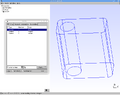 The mesh with three different parts.

gmsh
Gmsh to generate the triangles.
The command
gmsh model.geo -3
gmshToFoam model.msh
generates 3d triangulation and converts it.
yay -S gmsh-bin


