Arduino LCD I2C: Difference between revisions
From wikiluntti
| Line 121: | Line 121: | ||
<youtube>cjSjUN7kgP4</youtube> | <youtube>cjSjUN7kgP4</youtube> | ||
* See the video description for the files. | |||
** The Arduino file at https://drive.google.com/drive/folders/1mdnJol7ILM9eJCJ9jjvYxAZvTqESruLu | |||
Latest revision as of 16:27, 6 January 2026
Introduction
-
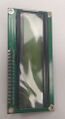
The front view of the display
-
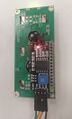
Backview, and the I2C pins.


Hitachi HD44780 LCD controller, and I2C controller. 16X2 LCD without I2C circuit has sixteen pins. The screen has 8 customizable character slots.
Potentiometer at the back side. Screw that to get the figures on screen.
Wiring and connecting
Arduino Uno. A5 is the default SCL pin, and A4 is the default SDA pin for I2C communication.
| LCD I2C | Arduino Uno |
|---|---|
| Vin | 5V |
| GND | GND |
| SDA | A4 |
| SCL | A5 |
Libraries
Liquid_Crystal_i2c by Frank de Brabander 1.12 works.
Check the address: Examples -> Wire -> I2C_scanner.
Simple example
#include <LiquidCrystal_I2C.h>

LiquidCrystal_I2C lcd(0x27, 16, 2); // I2C address 0x27, 16 column and 2 rows

void setup(){
  lcd.init();
  lcd.backlight();
}

void scrollMessage(int row, String message, int delayTime, int totalColumns) {
  for (int i=0; i < totalColumns; i++) {
    message = " " + message;
  }
  message = message + " ";
  for (int p = 0; p < message.length(); p++) {
    lcd.setCursor(0, row);
    lcd.print(message.substring(p, p + totalColumns));
    delay(delayTime);
  }
}

void loop(){
  lcd.clear();
  lcd.setCursor(0, 0);
  lcd.print("Hello World");

  scrollMessage(1, "www.luntti.net", 250, 16);
}
Create own fonts
Large fonts: https://www.instructables.com/Custom-Large-Font-For-16x2-LCDs/
See more at https://www.arduinointro.com/articles/projects/create-custom-characters-for-the-i2c-lcd-easily.
#include <LiquidCrystal_I2C.h>
LiquidCrystal_I2C lcd(0x27, 16, 2);

// Make custom characters:
byte Heart[] = {
  B00000,
  B01010,
  B11111,
  B11111,
  B01110,
  B00100,
  B00000,
  B00000
};
byte Bell[] = {
  B00100,
  B01110,
  B01110,
  B01110,
  B11111,
  B00000,
  B00100,
  B00000
};


void setup() {
  lcd.begin(16, 2);  // Specify the LCD's number of columns and rows:

  // Create new characters:
  lcd.createChar(0, Heart);
  lcd.createChar(1, Bell);

  lcd.clear();
}

void loop() {
  lcd.setCursor(0, 1);
  lcd.write(byte(0));
  lcd.setCursor(2, 1);
  lcd.write(byte(1));
}
Dinosaur game
- See the video description for the files.
- The Arduino file at https://drive.google.com/drive/folders/1mdnJol7ILM9eJCJ9jjvYxAZvTqESruLu


