ESP32 Easy short tutorial: Difference between revisions
Tag: Manual revert |
|||
| Line 296: | Line 296: | ||
* Datasheet https://www.nxp.com/docs/en/data-sheet/TJA1051.pdf | * Datasheet https://www.nxp.com/docs/en/data-sheet/TJA1051.pdf | ||
* | * | ||
== Motor Controller L293D == | |||
Though it can be used to drive to motors, this will guide only one. Use the following wiring and the program. | |||
== Linux tutorial == | == Linux tutorial == | ||
Great linux tutorial: https://curiousstuff.eu/post/how-to-blink-the-damn-esp32-built-in-led/ | Great linux tutorial: https://curiousstuff.eu/post/how-to-blink-the-damn-esp32-built-in-led/ | ||
Revision as of 18:34, 5 January 2026
Introduction
1
My ESP32 is 32WROOM-32
- https://docs.cirkitdesigner.com/component/61475118-b098-4ce5-a041-f984abcb9607/esp32-wroom
- https://www.az-delivery.de/en/products/esp32-developmentboard
- (https://www.mouser.com/datasheet/2/891/esp-wroom-32_datasheet_en-1223836.pdf)
-
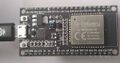
Front side
-
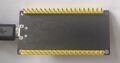
Back side and connections
-
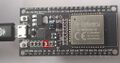
Tx light blinks when serial connection transfers data


Leds:
- Tx led blinks when transmitting data.
Pull Up Resistors
Enable pull up in Arduino-based ESP32 programming:
pinMode(13, INPUT_PULLUP); // Enable built-in pullup on pin 13
// Enable built-in pullup on GPIO12
  gpio_set_pull_mode(GPIO_NUM_18, GPIO_PULLUP_ENABLE);
Pull up resistors are between a digital input pin and the VCC. Two main purposes:
- Avoids issues with floating inputs.
- The default "ON" state for inputs like buttons and switches which actively pull the pin low. The pull up resistor keeps the circuit reading high until the button grounds the pin.
Some pins do not have pullup resistors:
- GPIO34
- GPIO35
- GPIO36
- GPIO39
Others do:
| Pin Name | GPIO Number | Pull Up? |
|---|---|---|
| GPIO0 | 0 | Yes |
| GPIO2 | 2 | Yes |
| GPIO4 | 4 | Yes |
| GPIO5 | 5 | Yes |
| GPIO12 | 12 | Yes |
| GPIO13 | 13 | Yes |
| GPIO14 | 14 | Yes |
| GPIO15 | 15 | Yes |
| GPIO25 | 25 | Yes |
| GPIO26 | 26 | Yes |
| GPIO27 | 27 | Yes |
| GPIO32 | 32 | Yes |
| GPIO33 | 33 | Yes |
For pins without built-in pull ups, or in output applications needing precise levels, you can add external pull up resistors. See the references for more information.
References:
Connect to Windows PC
See https://wiki.luntti.net/index.php?title=APC220_Radio;_Arduino#USB-TTL_converter
Uploading problems
Problem: Wrong boot mode detected (0x13)! The chip needs to be in download mode.
- press boot button on the esp32 board when run the code
- OR solder a 10uF capacitor between the EN pin and Ground (last pin on the ESP32 module). The EN pin on the ESP32 is used to enable or disable the chip; it must be pulled high to power on the device. If you want to enter programming mode, this pin should be low during boot, but it is generally recommended to keep it high for normal operation.
Problem: This chip is ESP32, not ESP32-S3. Wrong chip argument?
- Choose ESP32 Dev Module
Serial and Tx blink
Check that ESP32 works
void setup() {
    Serial.begin(9600);
}

void loop() {
  Serial.println("luntti.net");
  delay(500);
}
This should write a text to serial monitor every 0.5 secs and blink the Tx led at the same time.
Blink
Blink an internal led
No:(
Blink a led
-
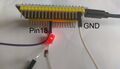
Blinking led. It is connected to pin18 and GND. Note that the (current limiting) resistor resistor is missing, because there is the pull-up resistor.

void setup() {
  pinMode(18, OUTPUT);
  // Enable built-in pullup on GPIO12
  gpio_set_pull_mode(GPIO_NUM_18, GPIO_PULLUP_ENABLE);
}

void loop() {
  digitalWrite(18, LOW);
  delay(1000);
  digitalWrite(18, HIGH);
  delay(1000);
}
Wifi
Bluetooth
HC-12 Radio link
Images


Theory
UART (Universal asynchronous receiver-transmitter) sends data bits one by one, from the least to most significant, framed by start and stop bits so that precise timing is handled by the communication channel. The ESP32 supports up to three UART interfaces (UART0, UART1, UART2).
- UART0 is usually reserved for communication with the serial monitor during upload and debugging. However, you can also use it for communication with other devices after uploading the code if the Serial Monitor is not needed.
- UART1 and UART2 are available to communicate with external devices.
The UART pins (Like I2C and SPI pin) can be mapped to any GPIO pin on the ESP32. However, they have a default pin assignment on most board models.
| UART port | TX | RX |
|---|---|---|
| UART0 | GPIO 1 | GPIO 3 |
| UART1 | GPIO 10 | GPIO 9 |
| UART2 | GPIO 17 | GPIO 16 |
Simple program
The simple code to test radiolink.
Connect
- VCC => 3.3V
- GNDN => GND
- RXD => TX2 (17)
- TXD=> RX2 (16)
- SET => 5
#define RXD2 16	//(RX2)
#define TXD2 17	//(TX2)
#define HC12 Serial2  //Hardware serial 2 on the ESP32

void setup()
{
  pinMode(5, OUTPUT);
  digitalWrite(5, LOW);           //Normally HIGH, LOW for settings
  Serial.begin(115200);           // Serial port to computer
  HC12.begin(9600, SERIAL_8N1, RXD2, TXD2);      // Serial port to HC12
}

void loop()
{
  while (HC12.available()) {
    // If HC-12 has data
    Serial.write(HC12.read());      // Send the data to Serial monitor
  }
  while (Serial.available()) {
    // If we have data from Serial monitor
    HC12.write(Serial.read());      // Send that data to HC-12
  }
}
Transmit data
A simple program to transmit data every second.
#define RXD2 16	//(RX2)
#define TXD2 17	//(TX2)
#define HC12 Serial2  //Hardware serial 2 on the ESP32

int x = 100;
unsigned long previousMillis = 0;
const long interval = 1000;

void setup(){
  Serial.begin(115200);
  HC12.begin(9600, SERIAL_8N1, RXD2, TXD2);
}

void loop() {
  unsigned long currentMillis = millis();
  if (currentMillis - previousMillis >= interval) {
      previousMillis = currentMillis;
      x = x + 1;
      HC12.println(x);
  }
}
CANbus TJA1051 T/3
Adafruit T/3 should mean that it is 3.3V compatible. All TJA1051 variants are not.
Connections
Note that Rx pin need not to be connected while uploading programs into ESP32.
Pins
- Vcc: the same power as the logic level of your microcontroller (Arduino: 5V, ESP32 3.3V)
- GND - common ground for power and logic.
- RX - CAN receive/input. Connect to ESP32's RX. Do not connect when uploading.
- TX - CAN transmit/output. Despite sharing the 'RX' and 'TX' name with UART, they're not at all the same interface. Connect to ESP32's TX.
- CANh
- CANl
CarCluster
esp32_can library
ESP32-TWAI-CAN library
Install the library using Arduino IDEs library tools.
https://github.com/handmade0octopus/ESP32-TWAI-CAN
References
References
- Adafruit https://learn.adafruit.com/adafruit-can-pal
- Datasheet https://www.nxp.com/docs/en/data-sheet/TJA1051.pdf
Motor Controller L293D
Though it can be used to drive to motors, this will guide only one. Use the following wiring and the program.
Linux tutorial
Great linux tutorial: https://curiousstuff.eu/post/how-to-blink-the-damn-esp32-built-in-led/


