Creality Ender-3 V3 SE: Difference between revisions
From wikiluntti
| (5 intermediate revisions by the same user not shown) | |||
| Line 1: | Line 1: | ||
== Introduction == | == Introduction == | ||
https://wiki.creality.com/en/ender-series/ender-3-v3-se | |||
https://ender3-tuning.blogspot.com/2024/10/fine-tuning-printer-settings-for.html | |||
== First Layer problems == | == First Layer problems == | ||
| Line 11: | Line 15: | ||
=== Adjust z offset === | === Adjust z offset === | ||
<gallery> | |||
3d print Z heights.jpg| The difference of different Z heights. | |||
Zindex difference.jpg| The Z height seem to change. | |||
</gallery> | |||
Z offset test. | |||
Initial Z Offset: After auto-leveling, the Z Offset is usually set around -2.35 mm. | |||
=== Sticking problem === | === Sticking problem === | ||
Latest revision as of 13:41, 27 March 2026
Introduction
https://wiki.creality.com/en/ender-series/ender-3-v3-se
https://ender3-tuning.blogspot.com/2024/10/fine-tuning-printer-settings-for.html
First Layer problems
PLA:No need to use a glue stick. Some Isopropyl Alcohol and wipe down the bed between prints, and it'll print perfectly.
- Rough first layer: Caused by nozzle too close to bed. Adjust Z-offset and run calibration test.
- Gaps between lines: Caused by nozzle too far from bed. Level the bed and increase first layer height and width.
- Poor adhesion: Caused by low bed temperature, dirty bed, or incorrect adhesive. Clean the bed, raise the temperature, and use suitable adhesive.
- Inconsistent first layer: Caused by different filament types or printer models.
Adjust z offset
-

The difference of different Z heights.
-
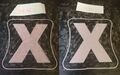
The Z height seem to change.


Z offset test.
Initial Z Offset: After auto-leveling, the Z Offset is usually set around -2.35 mm.
Sticking problem
Adhesion.
Use glue.
Weird first layer. Nozzle too close to the bed? Bed not hot enough? https://www.reddit.com/r/3Dprinting/comments/64n0t3/weird_first_layer_nozzle_too_close_to_the_bed_bed/
Increase/ decrease by 0.1.


